Friday, 26 August 2016

Official Bypass iPhone 6s iCloud Activation Lock & Remove iCloud ( iOS Assisance )


Official Bypass iPhone 6s iCloud Activation Lock & Remove iCloud Account If :

    Forgot iCloud password
    Forgot iCloud id
    Forgot iCloud email
    Forgot iCloud keychain password
    Forgot iCloud backup password
    iCloud password recovery

iPhone 6s iCloud Activation Lock Bypass Server Method

    To Bypass iPhone 6s iCloudActivation with a Server, follow these step by steps to acquire back the major functionalities of your iDevice:
    Bypass iPhone 6s iCloud Activation Lock DNS servers

    If you are in USA/North America, type in 104.154.51.7
    If you are in Europe, type in 104.155.28.90
    If are in Asia, type in 104.155.220.58
    In rest of the world, type in 78.109.17.60

    Reset you iPhone 6s device.
    “> Slide to set up” under “Hello screen”.
    Choose your language & country.
    Choose your localWifi network; Tap Next.
    When you get the “Activate iPhone 6s Screen”click Home Button once.
    ClickWifi settings (check Image 1).
    Clickthe “I” icon corresponding to your Wifi network (make sure with Image 1).
    ClickDNS Server field > Select every one > remove the IP you have in this field > Paste the IP from one of the iPhone 6s iCloud Activation Servers you see bellow. For example: “109.17.60“.
    ClickBack > completed.
    ClickActivation Hello.
    Click“Menu“.
    You are complete. Currently you have right of entry to the main iPhone 6s functionalities (Email, Maps, Social, Internet, Videos, Music and SMS etc.).

Finally, we must tell you that this is a sensible iPhone 6s iCloud Activation Lock Bypass process. The creators of the tools wanted to help honest people with their idevices, not thieves and scammers. Use it at your own judgment.

Saturday, 25 June 2016

Apple iOS 10 extra features you should know about (iOS Assistance )

Lockscreen camera and 'widgets'

It's easier than ever to flip on the camera with iOS 10 because sliding the lockscreen right (when Control Center isn't open) automatically transitions to the camera app.
 This is a camera app shortcut we've seen on several Android phones and it beats reaching for the bottom right corner, where the camera shortcut remains in iOS 9. You use the camera app everyday, why not make it easier to access?


What happens when you swipe to the left on the lockscreen? Glad you asked a second question. It reveals a new spot for Apple's Today menu "widgets." It's not as customizable as Android widgets, but it's new location a big improvement.

Graphical 3D Touch shortcuts

Within the home screen, 3D Touching app tiles like Activity gives you a more graphical account of your fitness goals. You'll know faster than ever that you have to close those daily activity rings.


ESPN had even richer shortcut information within its 3D Touch menu. It runs scores and there's a button to easily add a widget. It's even more graphical, throwing up a drawn out play-by-play interface and video of in-progress games you're following.
All of this peeking at apps can be done without leaving the home screen, and it means that 3D Touch is becoming a little more relevant in iOS 10.

Talk to Siri normally

Two billion requests a week go through Siri, and it's now going to do "so much more," according to Apple. With that, they announced that iOS 10 will open up Siri to third-party developers.


Now you'll be able to ask Siri things like, "Send a WeChat to Nancy saying I'll be five minutes late.'" It can be said variety of ways and still understood by the now-smarter Siri.
In (very literal) other words, Siri also works just fine if you say it like "Tell Nancy I'll be five minutes late with WeChat," and even "Siri, can you shoot a message on WeChat and say I'll be five minutes late?"
Siri for iOS 10, all of a sudden, is going to be a whole lot less "Sorry..." for miscues. This is thanks to what Apple calls an "intense API," which even functions in this new way in its multiple languages.

Siri third-party apps

Besides WeChat, Siri is ready for other chat apps, like WhatsApps and Slack, and ride hailing services like Uber, Lyft and Didi in China (which Apple invested in recently).


Searching photos through apps like Shutterfly and Pinterest can be done with your voice thanks to Siri, and you can start, pause and stop fitness workouts with MapMyRun, Runtastic and RunKeeper.
Siri can also help you send money to friends with Number26, Square and Alipay, or start a VoIP call to tell your friend why you're not paying them on time via Cisco Spark, Vonage and Skype.


This makes Siri much more useful now that Apple's personal assistant has broken free of pre-loaded apps, and makes driving a tiny bit safer thanks to messaging and VoIP integration for Apple CarPlay.

Siri-influenced QuickType keyboard

Apple's on-screen QuickType keyboard can intelligently tell the difference between what you're saying and what computers usually think you're saying (but not) thanks to more advanced Siri intelligence.

Using deep learning, it's able to understand the wider context of what you're typing, influencing the words in the suggestion bar above the keyboard. It has better context by taking into account the whole sentence, not just spitting out the next guess based on the previous word.
QuickType is also adding a handy button for your current location whenever someone asks "Where are you?" or requests someone else's contact information. That Contacts app will go further unused.


Locally, Siri uses deep learning to analyze a conversation and is able to pick up on you and a friend talking about food, a proposed time and resturant address, and then pre-fill in Calendar event when you go to add it to the Calendar app. "Look at that, it's already halfway filled in," you'll say.
Rounding out the QuickType iOS 10 features is the ability to paste a recent address you looked up without having to copy it to the clipboard, do the same for movies and restaurants you've searched and adjust to your multilingual typing.
It's Apple new "easy button" for iOS 10, and it's all about shortcuts to everydayactivities.


Photos with advanced computer vision


iOS 10 is going to make use of deep learning so that it'll be easier to organize photos with what it calls "advanced computer vision." This is how Apple plans to rival Google Photos.
iOS 10
Again, stressing that it's done locally, Apple touts the Photos app's ability to create albums based on face recognition, and can do the same for object and scene recognition thanks to 11 billion computations. It also serves up a way to see photos overlaid on a map based on where they were taken.
Apple plans to take Photos to the next level with Memories, which are supposed to remind you of events in life by clustering together photos into trips, people and topics. It seems to have a nice
magazine-style interface I can get behind.
 iOS 10 will also let you assemble your captured photos and videos of a particular memory with a special movie that's cut automatically. It's customizable, with a number of mood choices and three length options, just in case you don't want to fine tune it yourself.
Despite the AI-infused deep search and facial recognition capabilities, Apple promises privacy protection.

Apple Maps is way better

iOS 10 fixes my biggest complaint about Apple Maps - its inability to scroll ahead on a route. Right now, Maps annoyingly springs you back to your current location whenever you try to look anywhere else.
You'll be free to pan and zoom around the map with the new Apple Maps update and the navigation software is also dynamically zooming in and out of long stretches and complex interchanges.


Maps for iOS 10 is adding traffic on route to better compete with Google Maps and expanding its Nearby functionality with more points of interest that you can find along your route.
Vehicles that supports Apple CarPlay not only get suggested alternate routes based on traffic conditions, Maps' turn-by-turn directions can pop up on the instrument (if they have a screen next to the odometer).
Apple is weaving iOS 10 information from other apps into Maps, like if it knows you go to work at a certain time, it'll make a suggestion for the route, or make one based on a calendar event address.
That's just the start. It's also opening up Maps to third-party developers, so Uber riders can call, follow and pay for their ride without ever leaving Apple's app. It's getting there.

Apple Music

Apple Music with iOS 10 is being redesigned for its 15 million paid subscribers, and it "allows the music to be the hero," according to Apple. It lets the cover art  

It looks to be a much cleaner design, highlighting cover art properly and suggesting music that you'll like in a more logical fashion. But it's not going to excite you for iOS 10 if you're not a paid subscriber.
The Apple Music refresh does add some more depth by way of lyrics (though it doesn't seem to follow along with the words like other apps do, like SoundHound do).
The For You tab is does a better job at curating your personal playlists and it absorbs the Connect tab that we previously heard was getting a diminished role. Likewise, the 'New' tab has become 'Browse.'


Apple News

Apple News is reaching 60 million people every month with 2,000 publications and it's in for a redesign, too. The For You tab now breaks news into personalized topics and hand-picked stories by editors.
News for iOS 10 will also introduce subscriptions so that you can see every issue of National Geographic or read the Wall Street Journal, periodicals usually behind a paywall.
Breaking news notifications have been added to this pre-loaded app so that big stories appear right on the iOS 10 lockscreen.


Home app

Apple's developer-focused HomeKit is coming to end-users with iOS 10 (and also Apple Watch), and the new app appears right on the homescreen unsurprisingly called "Home."

It'll tie all of your home-based IoT gadgets together into a simple interface and include Scenes to change the mood of rooms in a pinch, no matter who makes your home's previously fragmented smart tech.
Siri acts as a shortcut to interact with your home accessories, and Control Center does too. Two swipes to the right in the Control Center menu brings up a grid of home accessory toggles.
  
Also from the lockscreen, you can peek at home notifications, say, if you get a doorbell alert. Peek into the notification by hard pressing on the bubble and a video doorbell like Ring will give you a live camera view.

Phone

Hate listening to voicemails? Never actually check them? Me too. That's why I'm excited that the rumored voicemail transcription idea made it into iOS 10.
It'll let you know what a voicemail message says via more convenient text right within the visual voicemail. Apple is also partnering with Tencent in China to alert iPhone owners there that an incoming call might be SPAM.


VoIP is no longer going to take a backseat, as a WhatsApp call, for example, can be answered right from the lockscreen, just like a normal incoming call. They'll also be part of your recent and favorites lists.

Messages

Messages is introducing rich links within a conversation and a live camera view as soon as you press the camera button. Like emoji's? You're going to love iOS 10.


Apple is making bigger emojis that are now three times as large as before, and the keyboard can now identify words you can easily replace with emojis via a single tap on each word.
There'll be bubble effects so you can "say it loud" with a bursting bunch of text, or say something "gently" with slow-to-exist texts.
 

You can also use "Invisible Ink" that requires the message receiver to slide their finger over a text or photo. It'll either be a nice surprise, or horrific shock to your friends.
Apple showed off an Invisible Ink demo in which a blurry photo turned out to be a bride-to-be's hand with a wedding ring on it. I'm pretty sure there are going to be a lot of appendages sent using Invisible Ink.
 

 You can react to individual messages with expression-driven Tapbacks (reminds me of Facebook reactions) and write out meaningful messages with handwritten "digital ink."


 With club disco lights, big emoji and full-screen fireworks for iOS 10, Messages is one crazy app. But it'll get even more insane in the future because Apple is opening up Messages to developers with an SDK.

 So far, Apple has shown off integration for licensed Disney stickers, food ordering services and bitmoji-like expressions provided by JibJab.

More to come from iOS 10

Rounding up iOS 10, Apple quickly mentioned Notes with multiple users editing a document, the ability to edit Live Photos without annoyingly relegating them to stills and a new conversation view for Mail.
On the iPad, Split View support for two Safari windows has been added, finally letting you open up dual Safari windows at once on your tablet, you multitasker, you.
Apple said that despite the deep learning capabilities of iOS 10, it'll keep that to the silicon on your device and not invade your privacy. It's been working on something called differential privacy.
We'll have more on iOS 10, as the developer beta prepares us for the iOS 10 public beta. When that launches in July, we'll certainly discover additional features to talk about.

Apple's iOS 10 update for iPhone and iPad ( iOS Assistance )

Apple's iOS 10 update for iPhone and iPad lives up to its milestone software version number, with the first official details announced at WWDC 2016 in San Francisco earlier this month.
It's filled with major changes for your daily phone and tablet routine, but don't worry, all of the new iOS 10 features are for the best - and absolutely free to download.


iOS 10 release date news beta and rumors

The Cupertino company laid out all of its mobile operating system specs in an all-too-appropriate ten segments. We break it down even further. Here's what we learned about iOS 10.

iOS 10 release date

Apple is once again planning a staggered iOS 10 release date among app developers, public beta testers and then everyone else who wants to wait for the final version.

Three different iOS 10 release dates, depending on who you are
Technically, iOS 10 is out right now, launching the same day as WWDC in beta form to developers. It's not ready for average iPhone and iPad users who aren't making apps just yet.
Don't worry, you won't have to wait too long to test out iOS 10 on your own. Apple is planning an iOS 10 public beta in July, and it'll help squash bugs two months before the official release date.
That's good news. Last year's public beta was a success for Apple judging from the smoother sailing of iOS 9, and it continued that streak with new iOS 9.3 features that also went through a three-month beta.
If you decide to wait for the final version of iOS 10, it'll take a while longer due to additional bug testing. A stable version of iOS 10 should launch alongside the new iPhone 7 and iPhone 7 Plus in September.

iOS 10 compatibility

iOS 10 is coming to your iPhone, iPad or iPod touch, unless of course you have an age-old phone or tablet that still uses the 30-pin dock connector or is an older iPod touch.


That's where Apple draws the new line in the sand for 2016. Its forthcoming mobile operating system update won't support for iPhone 4S, iPad 2 and iPod touch 5th gen.
It's not a big surprise. In addition to their non-lightning connections, these devices include 512MB of RAM and stuck around for iOS 9 when we thought they'd be axed from that update last year.

iOS 10 raise to wake

Apple redesigned the iPhone and iPad lockscreen, giving us the biggest revision since the first iPhone nine years ago. Slide to unlock is gone and replaced with simple instructions: "Press Home to open."


Rich lockscreen notifications

You'll see that notifications are broken up into bubbles now and use 3D Touch to show hidden menu actions - just hard press on a calendar invite alert and you'll be able to accept or decline it.


3D Touch-enabled iOS 10 notifications work even better for Messages. You can immediately respond to messages as soon as you pick up your phone, without ever leaving the lockscreen. It's all done inline.
No more digging around the home screen and layers of app menus to check vital information. If you have a doorbell camera notification, you can see who's at the front door, use the intercom or unlock the door.
iOS 10
This "peeking at apps" capability via the lockscreen isn't limited to Apple's first-party apps. Uber is just one third-party app maker that allows you to hard press on notifications. You'll get live updates on where your driver is on a map - usually headed in the other direction.

Clear all notifications button

What may be the best change to iOS 10 notifications is the ability to clear all of your old notifications with 3D Touch. Swiping them away one by one or dismissing them in groups is a time-consuming mess in iOS 9.

Just hard press that little "x" icon within the redesigned (and now dedicated) notifications pulldown menu and tap the "clear all" box that pops up. Tap it once to just dismiss the group of notifications.

It's super easy to clear away expired alerts with iOS 10 and it will please everyone inflicted with phone notification-clearing OCD.

Control Center is decluttered

The swipe-up-from-the-bottom Control Center overlay menu has a brand new look that helps declutters the layout in iOS 10, and it's something Apple users have been asking for.


It once again features four app shortcuts along the bottom flashlight, stopwatch, calculator and camera app) and moves the fifth Beatle, Night Shift, to a new, bigger spot above the quartet.
That fixes an issue where people said having five app shortcuts in that bottom row, a short-lived idea that came about when Night Shift debuted in iOS 9.3, made the buttons a tad too small.


Bigger AirPlay and AirDrop buttons appear above Night Shift, too, while toggles for Airplane mode, WiFi, Bluetooth, Do Not Disturb and Orientation lock are unchanged (except for their new blue hue when on).
But what happened to the music controls? Slide right on the Control Center, and there's a dedicated pane for the volume, playback and device output controls, and even music album cover art.


 We hope we got you well informed as more updates on the iOS 10 will be brought to you once verified and confirmed .


SUBSCRIBE x FOLLOW x SHARE

Apple is changing the way you unlock your iPhone in iOS 10 ( iOS Assistance )


When you update to iOS 10 this fall, you'll quickly realize that the iPhone's iconic "slide to unlock" gesture is gone.
To get past the iPhone's lock screen, Apple has added two new
swipe gestures. Swiping right from the lockscreen will take you to the iPhone's camera, and swiping left goes to a list of customizable widgets, which are essentially mini versions of your favorite apps.
"Slide to unlock" itself has been replaced with "press home to open," so you can press the home button to enter your passcode. If you have an iPhone with a Touch ID fingerprint sensor, then unlocking your device works the same way.
Here's a video from MacRumors that shows off all of the changes coming to the iOS 10 lockscreen in more detail:


Saturday, 28 May 2016

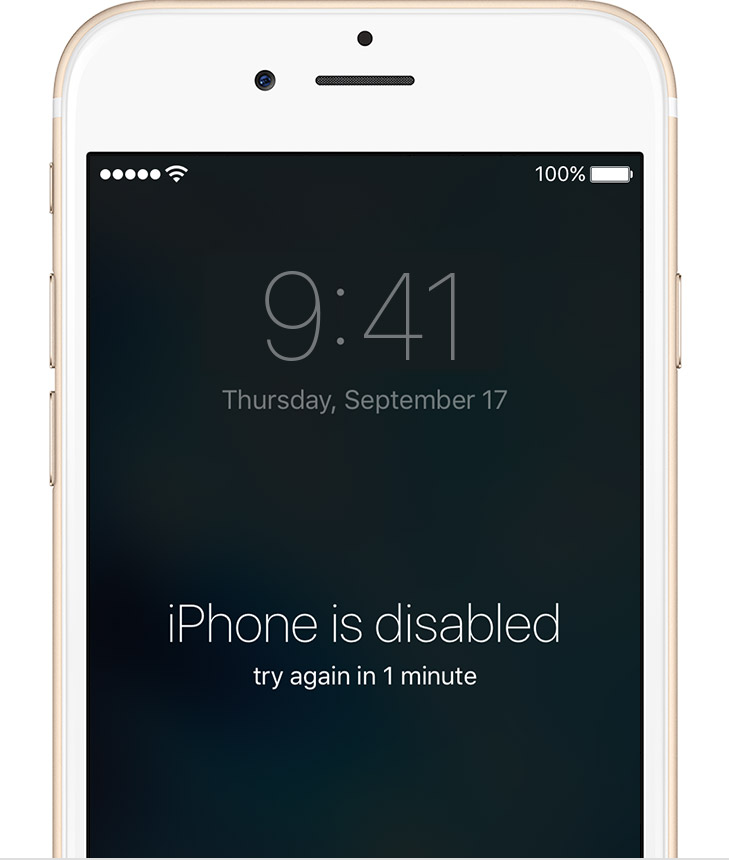
iPhone is Disabled, here's a fix

If you forgot the passcode for your iPhone, iPad, or iPod touch, or your device is disabled


Follow these steps if you've forgotten your passcode, or if a message says that your device is disabled.


If you enter the wrong passcode in to an iOS device six times in a row, you'll be locked out and a message will say that your device is disabled.

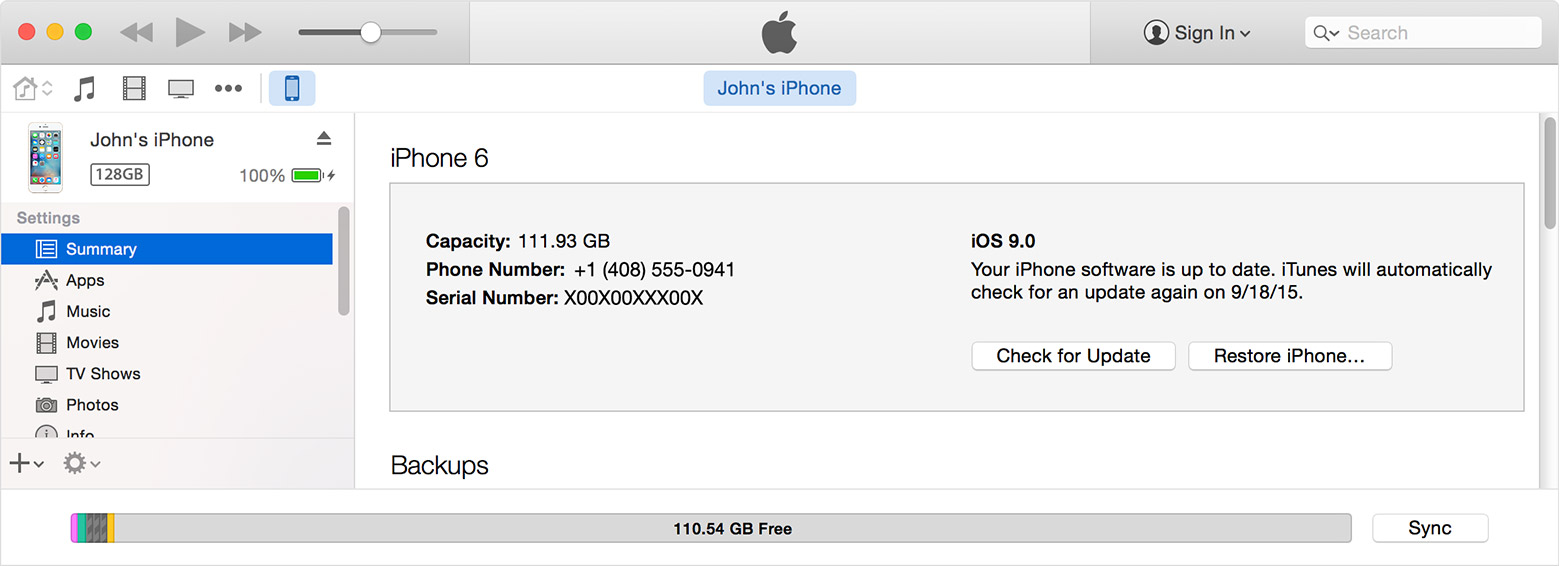
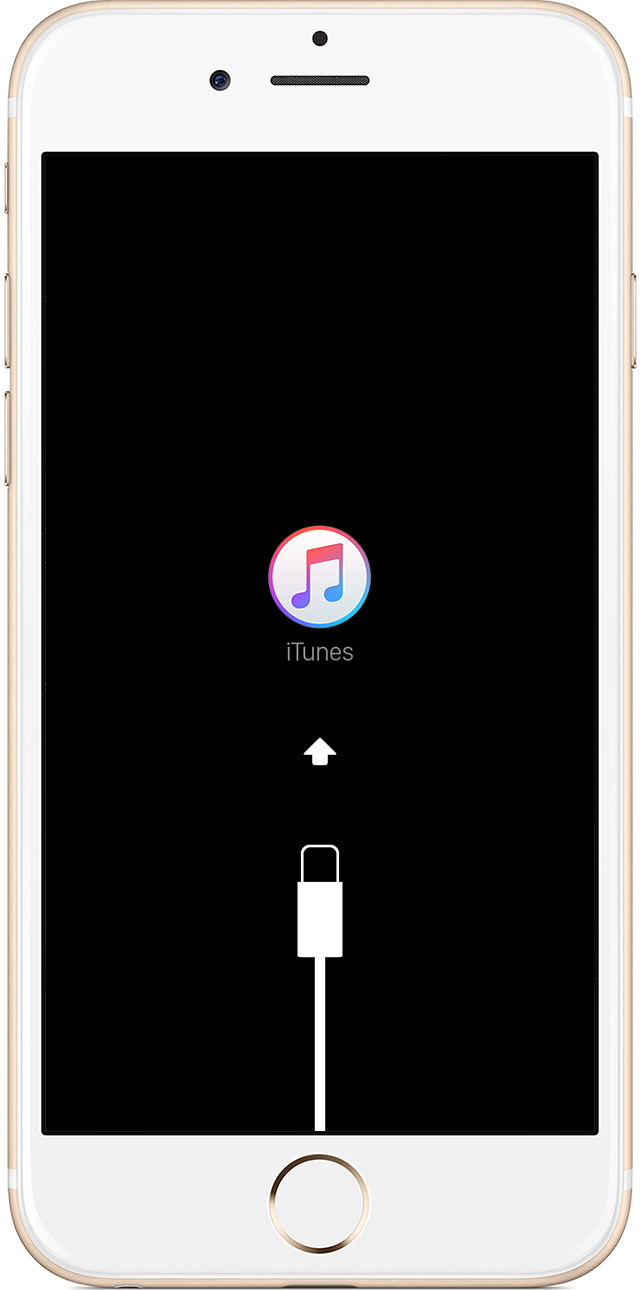
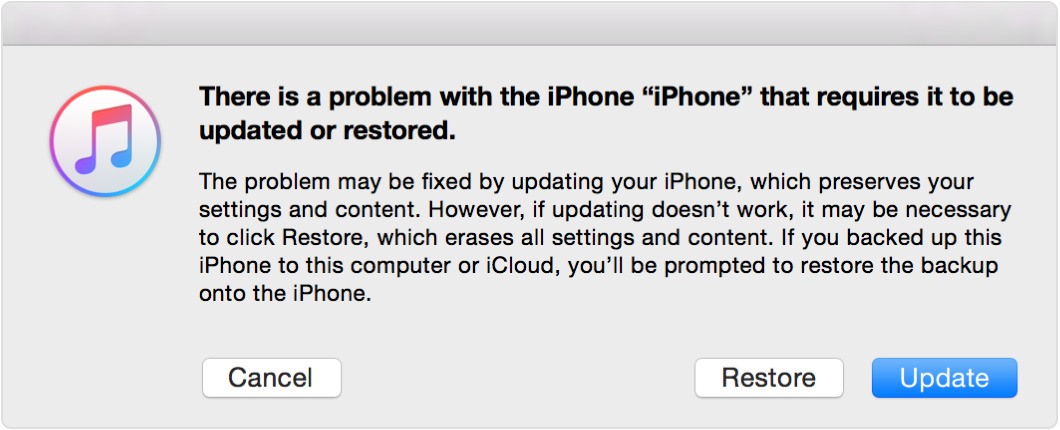
Pick a way to erase your device

Unless you made a backup before you forgot your passcode, there isn't a way to save your device's data. You'll need to erase your device, which deletes all of your data and settings. Choose a way to erase:


free">

Monday, 2 May 2016

How to clear iTunes ERROR 310 [ video ]


PLEASE DO SUBSCRIBE TO THIS BLOG
SHARE AND INVITE .

Saturday, 23 April 2016

Apple iPhone 7 . Release dates ,Features and Proposed Designs ( iOS Assistance )

Summary

Apple is expected to launch a next-gen 4.7-inch "iPhone 7" this September, within its usual timeframe. The previous iPhone 6 and iPhone 6s design will be changed, as Apple is believed to be planning an all-new chassis that will eliminate the camera "bump," as well as visible antenna bands. Expect a faster processor, better camera, and potentially the elimination of the 3.5mm headphone jack, requiring either Lightning or Bluetooth headphones.

Features
  • Will probably ship in September
  • New, thinner design with no camera bump
  • Next-gen A10 chip with 2GB of RAM
  • 16/64/128GB capacities
  • Starting at $199 on contract, $649 without
  • Could ditch 3.5mm headphone jack
  • ● Probably     ● Maybe     ● Probably not


Appearance & Design

Early reports suggest Apple's next-gen iPhone will be even thinner than current models, potentially between 6.0 to 6.5mm thick. The slimmed down chassis is also expected to boast a revamped design. Some rumors claim iPhone 7 will move away from an all-metal construction to a new as-yet-unknown material, possibly ceramic. Other rumblings point to a completely flat screen that does away with curved edges found on iPhone 6s.
The phone may or may not be fully waterproof, which would be an evolution from the iPhone 6s, which is only partially water-resistant. If the headphone jack does disappear, it may be replaced with a second speaker.
Dubious case leaks have suggested the possibility of a Smart Connector and/or a design without a home button.
Apple is thought to be preparing the usual two-model offering for 2016, likely sticking with 4.7-inch and 5.5-inch screen sizes. There are strong rumors that a 4-inch iPhone will make an appearance, but similar rumors have circulated ever since Apple moved to a larger format with the iPhone 6 and 6 Plus. 

Internals

Due to its slimmer profile, iPhone 7 is expected to integrate existing 3D Touch technology that detects pressure input via capacitive sensors embedded in the handset's backlight array. Apple will likely introduce a new system-on-chip design in 2016 which, if current naming conventions hold, should be dubbed A10. An M10 motion coprocessor is also likely to make an appearance, potentially embedded into the A-series SoC as with 2015's M9 design.
Apple reportedly tapped Taiwan Semiconductor Manufacturing Company to handle all A10 processor orders, a change from iPhone 6s which saw its A9 dual-sourced from TSMC and Samsung. 
The iPhone 7 and/or the 7 Plus may potentially be equipped with a dual-lens camera, using two 12-megapixel sensors -- the second supporting a 2-3x telephoto lens. Supply issues could theoretically limit the dual-lens feature to a special model of the Plus, although one case leak suggests that the standard iPhone 7 might at least have a very different camera design.
https://www.blogger.com/blogger.g?blogID=6790848634252271057#editor/target=post;postID=8148330824419834992 
The phone could come equipped with a 7.04Whr battery, an upgrade from the 6.61Whr in the iPhone 6s.

Release Date

No hard evidence exists regarding Apple's iPhone 7 launch plans, but the company traditionally debuts its smartphone in early September with sales following one week later. With iPhone 6s, however, preorders went live two weeks prior to shipments.


iOS 9.3 Jailbreak Release Date, Rumors and Updates


iOS 9.3 is now available for download and brings with it, several new features. You get the Night Shift mode, TouchID for notes, more 3D Touch shortcuts for apps and a tonne of new improvements and bug fixes.
Now that it’s out, jailbreak teams are probably hard at work trying to release a tool to jailbreak iOS 9.3. We’ve already seen leaks and videos of hackers successfully jailbreaking iOS 9.3 betas. The last beta, is very similar to the public release, which means that a jailbreak is definitely possible.
Unfortunately, the hacker who managed to jailbreak the iOS 9.3 betas, will not be releasing any jailbreak to the public. Therefore, we will have to wait for teams such as Pangu or Taig to come up with a solution. Recently, Pangu released a jailbreak for iOS 9.1, but not many users are on that firmware.
Most people who want a jailbreak, are either on iOS 9.0 – 9.0.2 or are waiting for an iOS 9.2.1 jailbreak. We’re not sure if there will be an iOS 9.2.1 jailbreak anymore, now that iOS 9.3 is out. And there’s no way the jailbreak teams will wait till iOS 10 to release a new jailbreak.
It has been six months since the last jailbreak release, so it’s about time a new jailbreak is released. Hopefully, it’ll be for iOS 9.3 and happen soon. If you want a jailbreak, do not update to iOS 9.3.
Those who don’t want a jailbreak or can no longer wait, should update to iOS 9.3. Between iOS 9.0.2 and iOS 9.2.1, there haven’t been plenty of changes, except for security updates and minor bug fixes. With iOS 9.3, there are plenty of new features and improvements, therefore urging users to upgrade.
We have no idea when an iOS 9.3 jailbreak will be released, but it could happen as soon as 1-2 weeks. If there are any new updates, we will let you know.

iOS 9.3 Jailbreak Release Date, Rumors and Updates

iOS 9.3 Jailbreak Release Date, Rumors and Updates: iOS Jailbreak 9.3.2 at WWDC 2016?


Update – April 21, 2016 – Apple has stopped signing the iOS 9.3 firmware, which means that if you had updated to iOS 9.3.1, you can no longer downgrade.
iOS 9.3 Jailbreak Release Date
This is also bad for the iOS 9.3 jailbreak, as most users are either on earlier firmware or on the latest iOS 9.3.1. If a new jailbreak is released for iOS 9.3, users on iOS 9.3.1 and on iOS 9.2.1 and earlier cannot enjoy it.
It is being reported by several sites that an iOS 9.3.2 jailbreak could be released at WWDC 2016.

Update – April 13, 2016 – It’s been almost a month since the release of iOS 9.3, but we haven’t seen any jailbreaks so far. Yes, you’ll find many fakes out there, but we recommend not to pursue any of them. As of now, there is no jailbreak for iOS 9.3 or iOS 9.3.1.
We’re not sure if anyone is even working on a jailbreak anymore, because Apple has moved past iOS 9.3.1 and is now testing iOS 9.3.2. It is possible that the jailbreak teams are now focusing on iOS 9.3.2 instead or perhaps are waiting for WWDC to release a jailbreak.
Apple is expected to talk about iOS 10 and most likely release a developer beta during WWDC this year. The jailbreak teams could thus be waiting for Apple to release the next major iOS update. This way, they can provide a jailbreak for all versions of iOS 9.3, including 9.3.1 and 9.3.2.

Update – April 2, 2016 – Now that Apple has released iOS 9.3 to the public, the wait for an iOS 9.3 jailbreak is on. The last iOS 9.3 beta was jailbreak friendly, so it’s only a matter of time.
Apple recently seeded iOS 9.3.1 to fix bugs that were present in iOS 9.3. According to a new report, jailbreak teams could be waiting for Apple to fix the bugs on iOS 9.3 to release a working jailbreak.
The report says that the release of an iOS 9.3 jailbreak could’ve been delayed due to Apple working on a smaller update. And as suspected, Apple released iOS 9.3.1 with bug fixes.
Now, the jailbreak teams could release an iOS 9.3.1 jailbreak is one is ready. If such a jailbreak tool is ready, now would be a great time to release it.

Saturday, 9 April 2016

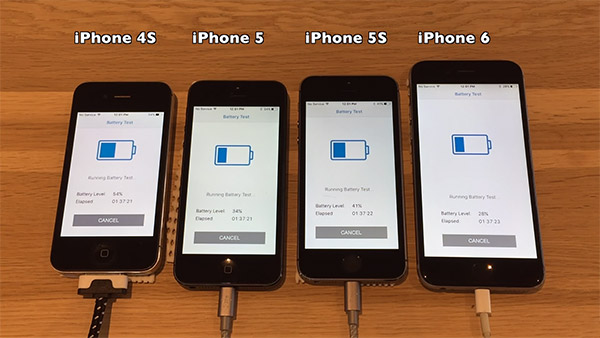
iOS 9.3.1 Vs iOS 9.2.1 Battery Life Comparison [Video] ( iOS Assistance )

Apple released iOS 9.3.1 last week as a response to some users finding that their devices would freeze or crash on interaction with links on iOS 9.3. There is even a build of iOS 9.3.2 now currently in testing by developers. Apple is clearly going to keep pushing new updates out at a rate of knots, and that can only be a good thing.
When Apple does release a new version of iOS, people inevitably start asking questions about whether they should upgrade, with battery life often one of the key reasons that someone either will, or will not upgrade at all. It’s difficult to say whether a newly released version of iOS will offer better or worse battery life due to the sheer number of variables involved, but that doesn’t stop people from trying.


iOS-9.3.1-vs-iOS-9.2.1-battery-life


And so here we are comparing iOS 9.2.1 to iOS 9.3.1 in order to see which is capable of performing best in a Geekbench battery life test. In order to get the best possible range of results, iPhones from the iPhone 4s all the way up to the iPhone 6 were tested, with the results taking hours to gather but distilled down into a ten-minute video.


As far as semi-scientific tests go, this one by iAppleBytes is certainly thorough.
First we charged all devices to 100% let them sit in the charger for an additional 30 minutes. Ran Geekbenchs test on all devices until the battery died, and filmed every wonderful moment.
We did this on iPhone 4S, iPhone 5, iPhone 5S and the iPhone 6. Using the same physical device to ensure the same battery life, first on iOS 9.2.1 and then again on the same device upgraded to iOS 9.3.1.
The results? As you might expect, iOS 9.3.1 performed best as far as pure Geekbench scores go, though iOS 9.2.1 does perform slightly better in pure time taken for a battery to fully drain. We’re not sure why, but there you go.
Of course, upgrading to iOS 9.3.1 is not just a decision to be made about battery life. Plenty of other fixes went into the latest version of iOS compared to 9.2.1, and so if you don’t care about jailbreaks, we’d suggest updating without delay.


https://youtu.be/rSmJEDGJMQM

(Source: iAppleBytes [YouTube])

Everything you need to know about iOS 9.3! ( iOS Assistance )


iOS 9.3 brings new features to the current version of Apple's mobile operating system for iPhone and iPad. Highlights include a new Night Shift mode, Touch ID security for Notes, greater personalization for News, app discovery in Health, Apple Music and Nearby for CarPlay, and a new education experience for iOS.


When is it coming out?

It's out! With it, comes Night Shift Mode, Notes Lock, and a whole lot more. We have everything you need to know.
 

How do I get iOS 9.3?

You can either download it over-the-air from the Software Update feature on your iPhone, iPad, or iPod touch, or download it via iTunes by connecting it to your computer. Here's how.


Who should be excited about it?

Everyone, because bug fixes and security updates are always great! More specifically:
  • Anyone who enjoys reading in bed or otherwise in the dark.
  • Anyone who keeps private information in Notes and needs better security.
  • Anyone who uses News but hasn't found the content personalized enough.
  • Anyone still searching for great Health and Fitness apps.
  • Anyone who uses CarPlay and has been waiting for more music and points of interest.
  • Anyone who uses iOS in the classroom.


So, Siri supports more languages now?

A few more regions and languages, yes! iOS 9.3 adds support for Malaysia (Malay), Finland (Finnish), and Israel (Hebrew).


What's the deal with Night Shift?

Our eyes and bodies were never designed to stare at computer screens all day. As a result, the blue light emitted from said screens can seriously mess up sleep schedules and lead to mid-day exhaustion and tension headaches. OS X has long had third-party utilities like F.lux to help address this problem with display recoloring, but with 9.3's Night Shift, iOS gets its own proprietary version.
It uses your geolocation data and local clock time to automatically determine when the sun sets in your area, and gradually shifts your iOS device's display to a less harsh, more late-night-brain-friendly hue. In the morning light, your display colors shift back to their normal state.
  • Night Shift in iOS 9: Explained
  • How to use Night Shift on iOS 9.3


    Is this going to make everything obnoxiously orange?

    No, your eyes should adjust pretty quickly to oranger hues, especially in darker environments. But yes, it will likely add an orange tint to your screen, making tasks like photo or video color correction slightly more difficult. But, don't worry. You can disable the feature if you really prefer to stare at glaring blue light in the evenings.


    I heard Notes has touch ID support now?

    It does! With iOS 9.3 you can secure all your notes—especially the ones that might contain private personal, medical, login, or financial data—with a password or with Apple's fingerprint identity sensor, Touch ID.
    That means, even if you lend someone your iPhone or iPad so they can call an emergency contact or keep busy while waiting for the food to arrive, they won't have access to your private notes.
    It's not the system-wide [Touch ID protection of Guest Mode]/./ios-9-wish-list-guest-mode) we've been waiting for, but it's a great start towards making iOS better protected so we can more comfortably share


    What's new with the News?

    There is now a New Top Stories section in For You that highlights the trending stories of the day, and you'll also get suggestions from the new Editor's Picks and curated channels made by Apple News editors.
    Video will now play right from the story, and iPhone is getting landscape support as well.
    Oh, and you can now change the text size in articles.


    And the Health app is going to make me healthier?

    I don't know if any app can make you healthier, but the Health app is certainly making it easier to keep track of your health. The app now has categories for your Apple Watch's move, exercise, and stand trackers, and even tracks your day-to-day goals. The Dashboard and Medical ID is now accessible with 3D Touch and Quick Actions on the Home screen. In addition, third-party developers can now use the Activity rings to share data with their apps.


    Didn't Apple Music get some love?

    That's right. You can now add songs directly from Apple Music's catalog to your playlist without having to first add them to your library. One step beyond!
    If you want to check in on what's playing on Beats 1, you can see it right on the Radio tab instead of having to go to the section. You can also watch videos in full screen mode on the iPad and getting to the album that a currently playing song is from is easier. Want to know which songs are the most popular on a given album? Well, you can now on Apple Music.


    I heard you can finally grab a still image from a Live Photo

    You heard correctly. When viewing a Live Photo, tap Duplicate to either make a copy of the live photo, or extract a still image. You can also now share Live Photos between iOS and OS X using AirDrop and Messages.


    Did Apple finally make it possible for me to re-download my audiobooks onto a different device?

    Aren't you the lucky one! Apple has finally added support for downloading previously purchased audiobooks from the iBooks Store. Plus, you can share your audiobooks purchases with anyone in your Family Sharing network. Sharing is caring.
    Apple also made some improvements to reading Manga and added Pencil support for highlighting and saving passages in e-books.


     What's this I hear about Dolby Digital on my iPhone?

    With iOS 9.3, you can play video encoded with Dolby Digital Plus. Your device now supports multichannel output when you use the Apple Lightning Digital AV adapter.


      CarPlay has some new stuff too, right?

    It does! If you have a CarPlay-compatible car, you now have better Apple Music integration, with both the New screen and For You custom playlist suggestion screen available to you. And if you're an Apple Maps fiend, CarPlay now supports the Nearby feature, which lets you quickly find gas,
     parking, restaurants, and more.


    What's this about iPad and education?

    The iPad got a huge education upgrade with iOS 9.3, and it's sure to make a lot of educators using iPads in their classrooms thrilled.
    The education improvements essentially boil down to three categories: Shared iPads, a new Classroom app for teachers, and the Apple School Manager app for OS X.
  • Empowering education with iPad and iOS 9.3


    What else?

  • Apple fixed a lot of issues with hardware keyboards. Plus, you can now use the arrow keys to navigate lists in Spotlight, Mail, and Safari.
  • Maps now supports a highlighted view of destinations and stops along a specific line in Transit mode.
  • Wallet now has the ability to access an app related to a card or pass.
  • Apple Pay now supports signing up for store rewards programs within the app at registers.
  • The Podcast app now supports full screen video playback.
  • There is a new Workout tab in the Activity app with monthly summaries of key metrics and the ability to filter by workout type.
  • Move to iOS now suggests apps based on content you had installed on your Android device.
  • iCloud Storage now warns you before you run out of space.
  • Two-factor authentication now works with all iCloud accounts.

Friday, 11 December 2015

Apple iOS 9.2 Release ( iOS Assistance )

Apple iOS 9.2 Release Admits To High Profile Problems.

Apple AAPL -2.58% has done something pretty great since the release of iOS 9: been upfront about things. After its near silence to bugs found in iOS 8, it has gone on record on multiple occasions in three months since the release of iOS 9 to front up to problems both big and small. And this has continued following the release of iOS 9.2 yesterday…
Following in the footsteps of other iOS 9 releases, iOS 9.2 has detailed and highly transparent release notes that openly confirm issues users have suffered. These include the heavily reported alarm bug (“Addressing an issue where updating iOS could prevent an alarm from going off”), iCloud failures news of which I broke (“Fixing an issue that prevented some manual iCloud Backups from completing”) and email attachment hangs (“Fixing an issue that caused mail attachments to be inaccessible for some users with POP email accounts”).


Apple iOS 9.2 is available now. Image credit: Gordon Kelly

In addition to this iOS 9.2 comes clean over a plethora of other issues:
  • Improved stability of Safari
  • Improved stability of Podcasts
  • Resolving an issue for some users that caused attachments to overlap text in mail
  • Fixing an issue where Live Photos could have turned off after restoring from a previous iCloud backup
    • Addressing an issue that could cause search in Contacts to display no results
    • Resolving an issue that could have prevented Calendar from displaying all seven days in week view
    • Fixing an issue where Camera screen on iPad could be black when attempting to capture video
    • Addressing an issue that could cause instability in the Activity app when viewing the day of Daylight Savings Time transition
    • Fixing an issue that could prevent data from appearing in Health
    • Fixing an issue that could prevent Wallet updates and Lock screen alerts from displaying
    • Fixing an issue where some users were unable to login to Find my iPhone
    • Addressing an issue where using the iPad keyboard could unintentionally trigger text selection mode
    • Fixing an issue on Cyrillic keyboards where caps lock would be enabled when typing in URL or email fields
    • Fixing issues with VoiceOver when using Camera face detection
    • Fixing an issue with speech rate of Speak Screen
    • Fixing an issue with Guided Access when trying to end phone calls
     It’s a pretty lengthy list covering almost every major area of the operating system (and actually omits mention of the Touch ID bug). That said, it also sets the standard for customer transparency in an age where Microsoft MSFT -1.85% has famously hidden numerous Windows 10 updates behind the vague description: “This update includes non-security-related changes to enhance the functionality of Windows 10 through new features and improvements.” Thanks a lot!
    Of course, despite it containing a mass of bug fixes, iOS 9.2 also brings six handy new features to the table. Consequently, while it remains far from ideal that iOS 9 has run into so many issues in its short lifespan (the scale of which is unknown, but clearly wide enough for Apple to call them out directly) it is a long way from the “Just avoid holding it in that way” era of responses.
    No software is ever bug free, but when bugs do come this is the sort of open admission users expect and deserve from all companies…

TaiG for iOS 9.0, 9.0.1, 9.0.2 and iOS 9.1 Jailbreak (iOS Assistance)

TaiG for iOS 9.0, 9.0.1, 9.0.2 and iOS 9.1 Jailbreak

iOS 9.1 Jailbreak [ updated on Dec 11, 2015 ]

iOS 9.1 Jailbreak is the latest and hot topic in jailbreak community nowadays and TaiG is the proud developers of iOS 9.1 Jailbreak tool. Team TaiG9 released iOS 9.1 jailbreak tool as a beta version and anyone can be a contributor of TaiG test team by evaluating it. Visit TaiG for iOS 9.1 Jailbreak from your iDevice (iPhone, iPad or iPod) to jailbreak iOS 9.1 running devices and install Cydia on it


https://youtu.be/m26kUcDdbyw
 

iOS 9.0 - 9.0.2 Jailbreak


A few days ago Apple released its latest iOS version, which is iOS 9.1 and with iOS 9.1 Apple killed iOS 9.0 - 9.0.2 Jailbreak. If you are running on iOS 9.0, iOS 9.0.1 or iOS 9.0.2 you can perform TaiG9 Jailbreak which is released for iOS 9.1. Additionally If you want a full jailbreak you can simply visit Pangu9 Jailbreak and download iOS 9.0 - 9.0.2 Full Jailbreak Tools for free.


Issues, Reviews and Ratings for TaiG iOS 9.1 Jailbreak


According to the reliable sources the number of iOS 9.1 Jailbroken devices are near to 0.5M for last 2, 3 weeks and the reported number of issues are near to 1K. The main issue in TaiG Jailbreak Tool is installing sources to Cydia. Also there is an intermittent issue in installing rooted applications using Cydia.
As per our experiences with iOS 9.1 Jailbreak by TaiG, We can give 3.5 star rationg for them out of 5. Also we have tried the jailbreak tool and reported a few issues to TaiG team. You also can participate in the testing and report issues to issues@taig9.com.


History of TaiG Jailbreak

With past experiances about jailbreaking we can keep our hopes about the TaiG9 team. TaiG is the team who released jailbreak tools for iOS 8.2, iOS 8.3 and iOS 8.4. After Apple's security improvements for iOS 8.4.1 only, it killed TaiG Jailbreak. As we all know there was a time period without a jailbreak tool for iOS 8.2 and iOS 8.3. But TaiG with its awesome set of developers, did a great job for jailbreak community by releasing jailbreak tools for the mentioned iOS versions.
Lee Chuan, who is an engineer of TaiG iOS 9.1 Jailbreak development team mentioned that they are still discovering iOS 9.1 and its security holes to develop a jailbreak tool. Further he mentioned that they hope to release it as soon as possible. The interviewer questioned whether they found any security holes to access the system root of iOS9 but Chuan just smiled and said "Not yet". That interview brought all the jailbreak lovers to a new perspective and they are waiting for TaiG to release the iOS 9.1 jailbreak tool as soon as possible. We cannot predict an exact release date but what we can say is the tool is on its way.


Cydia for iOS 9.1 running devices

You can istall Cydia easily to any device running on iOS 9.0, 9.0.x and iOS 9.1 by using TaiG 9 Jailbreak Tool. What you need to do is just visit taig9.com using your idevice and connect your iDevice with TaiG servers. It will automatically install Cydia on your iOS 9.1 running device within a few minutes. Getting Cydia to your iDevice is easier than ever with iOS 9.1 Jailbreak released by TaiG.