As you can see from the screenshot above, it include new emojis,
including a taco, burrito, unicorn face, hot dog, popcorn, turkey and
cheese wedge, and yes, even a silly middle finger.
This
over-the-air update may also bring new compatibility to the iPad Pro,
with its high resolution screen and Apple Pencil stylus, but so far
there are new detailed release dates.
iOS 9.1 can be downloaded
through the Apple Beta Software program (instructions above), and should
be available to everyone else soon. iOS 8.1, for example came out in
October.

Smarter Siri
Siri in iOS 9 is getting the much-needed smarts
to rival Google Now. Apple's personal assistant understands the word
"it" within context and brings proactivity to the operating system.
For
example, if you're talking about a topic with someone in iMessages and
ask Siri to "Remind me about 'this' later today," it'll scan the open
app and try to understand what "this" means.
iOS 9 proactivity
puts even more at your fingertips through Siri. It suggests appointments
to add to Calendar, and pulls up photos based on location and time with
the sound of your voice.
Siri's location-based knowledge appears to be most promising when
you're out and about. Plugging in headphones at the gym? It'll offer the
Now Playing interface right on the lockscreen.
Plugging it into
your car? It'll bring up that audiobook you were listening to before.
It'll even tell you when to leave for an appointment across town, a
feature that has made Google's app for iOS a must-have.
Saying
"Hey Siri" to issue commands while untethered from the usually-required
light cable is going to be possible, too. However, this iOS 9 feature
has only been announced for the new iPhone 6S and iPhone 6S Plus.
One of the most convenient new iOS 9 features is giving context to
random numbers that call you, diving into your email to see if it can
match the digits. Goodbye, telemarketers – we hope.
Siri already
takes over one billion requests a week, according to Apple. That should
only increase now that iOS 9 promises to make Siri 40% faster and 40%
more accurate.
Apple Pay expands
Apple Pay has been touted as a success over the last 11 months in the
US, and now the iPhone-backed mobile payment platform has made its way
to the UK.

The official Apple Pay UK launch of July 14 was backed by nearly 70% of credit and debit cards there, including Bank of Scotland, HSBC and, most recently, Lloyds Bank and Halifax.
Canada and China are thought to be next up for the iPhone 6 and iPhone 6 Plus mobile payment platform, but the company hasn't announce that broad of an expansion just yet.
In
the US, Apple Pay is now backed by 2,500 US banks and, this fall,
rewards and store-issued cards will be a part of the mobile wallet. This
is an idea we liked about Android Pay at Google IO in May.
Considering
these newfound iOS 9 capabilities, Apple is renaming Passbook (the app
where Apple Pay resides) to Wallet. It has also made the Apple
Pay-required Touch ID fingerprint sensor twice as fast as before on the
iPhone 6 and iPhone 6 Plus.
That may be enough to compete with the September 28 launch of Samsung Pay on the Samsung Galaxy Note 5 and its other new Android phones, which use even more nifty magnetic strip technology in addition to NFC.
Apple Maps
Apple Maps is sometimes unavoidable, even if you're a dedicated Google
Maps user. Siri and built-in apps still open directions up in the
default navigation app. That won't change.
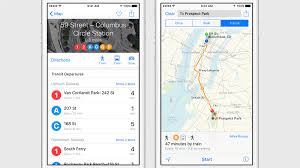
The good news is that iOS 9 is going to make Apple Maps better, and
maybe even tolerable. In its first major refresh since 2013, the app now
includes long-awaited public transit directions.
That means
routes for buses, trains, subways and, yes, even ferries are part of
Apple Maps. This goes live this fall in Baltimore, Berlin, Chicago,
London, Mexico City, New York City, Philadelphia, the San Francisco Bay
Area, Toronto and Washington D.C.
Notably, it'll support
directions for 300 cities in China, a huge emerging market for the
iPhone, including hotspots like Beijing, Chengdu and Shanghai.
Just
don't expect it much more than that to sway you from Google Maps or
Waze. The design changes are minimal and, as we articulately point out
in our
iOS 9 review, it clearly needs more UI work, not just new features.
Apple News app

In addition to getting rid of Passbook in favor of Wallet in iOS 9,
Apple is replacing Newsstand with News, and it's very familiar if you're
a fan of magazine-style news aggregators.
Apple News for iOS 9 is
Flipboard, HTC BlinkFeed and Feedly wrapped into one app. It features a
personalized feed and is coming to US, UK and Australia at launch.
There's
also Apple News integration outside of this app right on one of the
home screens. Four or five snippets of news appear within the left-most
menu, right below spotlight search, recent contacts and recent apps. In
this way, Apple is mimicking Samsung's left-most Flipboard menu, with
less pizzazz.
No telling if all of your favorite publishers will
wrap their content in the fresh Apple News format. The advantage to you,
however, is more clear: your data will remain anonymous, apart from
your Apple ID, according to the company.
Multitasking for iPad
iOS 9 brings true multitasking to its newer iPad tablets, and we're not
talking about the "multitasking" app switcher that premiered with iOS 4
back in 2010.
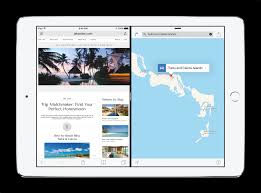
iOS 9 brings true multitasking to its newer iPad tablets, and we're not
talking about the "multitasking" app switcher that premiered with iOS 4
back in 2010.
iPads will finally be able to handle more hefty productivity tasks.
That's to the delight of enterprise users who prefer iOS for personal
use, but feel forced to opt for a Microsoft Surface Pro 3 or Android tablet at work.
There
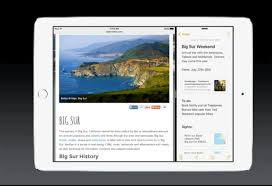
are three ways to view multitasking windows on an iPad. Slide Over
brings a second app from the side so you can answer a text or write
something in Notes. It's just as easy to slide away.
There's also a special Picture-in-Picture mode that puts videos and
FaceTime calls in the corner of the display when the home button is
pressed. From there, you can use any other app while watching the video.
Google's YouTube app for iOS works this very same way, at least within
that specific app.
Both Slide Over and Picture-in-Picture are compatible with newer iPads: iPad Air, iPad Air 2,
iPad mini 2 and iPad mini 3. The last mode, Split View, is an iPad Air
2-only affair, though Apple announced that iPad Pro would support all
multitasking functionality, too, when it arrives in November.
Split View is the mode that everyone imagines when they hear the word
"multitasking." It enables two apps to be open side-by-side and they're
both active at the same time, with full multitouch support.
Apple is clearly honing on the enterprise user with its latest tablet software features and iPad Pro announcement today.
New iOS 9 keyboard
Apple launched what it called its "best keyboard yet" with the iOS 8
QuickType, and it's trying to one-up that statement with the iOS 9
keyboard.
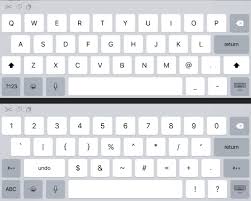
iPad's on-screen keyboard now features a built-in shortcut bar, which
flanks the next-word suggestions above the QWERTY letter keys. Shorts
are context sensitive and include cut, copy and paste to the left; bold,
italic, underline and attachments to the right.
That's better
than having to hunt for these shortcuts in the second layer of the
keyboard menu, and in a surprise move, Apple is making this default
layout customizable and compatible with third-party keyboard apps.
Cursor control is now easier with a handy (or fingery) slide mechanic
when using two fingers. It basically turns the iPad QuickType keyboard
into an trackpad. It's way easier than hovering over the tiny cursor,
trying to land in between letters.
Finally, shortcuts are coming to wireless keyboards so that you can
interact with apps using their own built-in shortcut keys. Pressing and
holding the Command, Option or Control key brings up the shortcut list.
iOS 9 Wi-Fi problems fix
Apple has also worked out a solution for when your Wi-Fi connection
is proving to be a massive pain. It's called Wi-Fi Assist, and it'll
automatically drop your Wi-Fi connection and jump onto your mobile
network whenever it's struggling.
You can switch it off if you're
on a limited data package but it's a great idea for those who have
spotty Wi-Fi connections and get annoyed at having to manually control
it.
Under the hood
New features are exciting and all, but iOS 9 needs to run better than
iOS 8, which had a series of Wi-Fi and battery drain problems from the
get-go. Some users are still complaining about last year's software.
Longer battery life is a chief concern of iPhone users, but they can
squeeze out an extra hour thanks to a new Low Power mode. Apple says iOS
9 pulls switches you didn't even know existed to save juice.
You
may be able to install iOS 9 this time around without deleting all of
your photos. It'll take about 1.3GB, whereas iOS 8 needed a massive
4.5GB of internal storage. That was awful on a 16GB iPhone.
CPU
and GPU usage will be more efficient thanks to iOS 9, further improving
performance, and security is said to be stepped up. Hopefully that means
last year's iCloud hack isn't going to be an annual incident.
Not mentioned during Apple WWDC keynote, a "Move to iOS" app is
hidden within iOS 9. It'll be easier to wirelessly switch from an
Android device to a new iOS phone or tablet.
iPhone and iPad users
may be surprised when asked to enter a six-digit passcode instead of an
easier-to-crack four digit code. But it's the difference between one
million possible combinations and 10,000, and Touch ID really makes the
hassle a moot point. Better safe than sorry.
Apple's rather confident iOS 9 public beta is showing a lot of promise, even if it's an incremental update. Google's Android Marshmallow is taking the same cautious approach. We'll see how they both turn out in a matter of days.