Thursday, 6 September 2018

Update on iOS 12 release date, features and news ( iOS Assistance )


There are a lot of new iOS 12 feature to get excited about, and we're going to hear all about them again (and the release date for the final software) on September 12.
One week from today,  Apple's iphone XS and Apple Watch 4 launch event will take place. Based on the event timing, we have a very good on when the final software will come to your iPhone and iPad.
What's new? When will you be able to get iOS 12? New features like Memoji, Group Notifications, and better overall performance will likely launch September 18.
Of course, you can get the iOS 12 beta right now and it's already better than iOS 11. It also gives us preliminary insight into iPhone XS and Apple Watch 4.
Good news: Apple is already up to iOS 12 developer beta 9 and we've tested features like the Measure app, Siri Shortcuts, and created a Memoji of ourselves. Our older iPhones are also faster, while Grouped Notifications make the UI easier to navigate.
Bad news: Group FaceTime was delayed, and it won't launch as part of the software on (or around) September 18. Expect it in iOS 12.1, maybe sometimes in October.
Apple is making its mobile operating system reliable and competitive with Google's Android Pie,That much is obvious.
Here's what we know about iOS 12 based for your older iPhone and iPhone XS.

iOS 12 release date
  • June 4 – Developer beta launched (to paid Apple Developers)
  • June 25 – iOS 12 public beta launched (it's free)
  • Tuesday, September 18 (or close to it) – the final iOS 12 software (still free)
You can now test it early, as there are three iOS 12 release dates: one for developers, one for public beta testers, and one final version coming soon for everyone else.
The developer beta is available now and gets more frequent refreshes. But it's early software and you must be a registered Apple developer. That costs money: $99 for the annual membership. It's for people who like to tinker with software weekly, and so far Apple is on iOS 12 developer beta 11.
The iOS 12 public beta is the one most people will want to test out, and it's also now available to download. It launched on June 25 and is completely free. It's also likely to be less problematic than the developer beta. Expect more stable updates every two to three weeks. The downside? Apple's public betas are always one step behind what the developers have access to.
Both versions of the iOS 12 beta will be unfinished software, so we advise you to proceed with caution before deciding to install iOS 12 beta on your primary device. For example, the iOS 12 beta 1 was great for us, but we had minor reset problems with iOS 12 beta 2. Waiting for the final iOS 12 version is a safer choice if you rely on your iPhone daily.
The release date for a stable iOS 12 version should be in mid-September, alongside new iPhones XS and iPhone XS Plus. No guarantees, but that's how it seems to work every year. History has told us that it's  the Tuesday after the iPhone 9 and iPhone XS launch event, so on or around September 18 seems likely.

iOS 12 reliability
  • Apple's looking to put the problematic iOS 11 behind it
  • Older iPhones will be 40% to 70% faster at certain tasks
iOS 12 will focus on reliability and performance with this update, and support all of the same iPhones and iPads that iOS 11 worked with.
Apple called out the iPhone 6 Plus, specifically, saying iOS 12 makes this phone 40% faster at launching apps, 70% faster at launching the camera app, and 50% faster at displaying the keyboard. Keyboard typing and other routine features on older iPhones can slow down with every new iOS update, and Apple is looking to change these pain points with iOS 12.
This makes your existing iPhone and iPad more reliable, and your older devices can be used by family members or be sold now that they'll be more function with iOS 12. They don't have to sit in a draw because they're too slow.
Here's a concrete example already: for us, the public beta has been reliable enough to download. There's the occasional iPhone reset or hangups, but we actually found it to be more reliable than the problematic iOS 11 in some instances. So far, so good.

iOS 12 hints at Apple Watch 4
Apple is readying an Apple Watch 4, at least according to an iOS 12 developer beta 2 update that references Watch4,1, Watch4,2, Watch4,3 and Watch4,4.
qUCd7MuJe39B4FD8STGx38-650-80.jpg
That indicates two sizes and both LTE and non-LTE versions of the smartwatch. It's just like we saw from the Apple Watch 3, originally referenced as Watch3,1 to 3,4.
Apple Watch 4 rumors indicate a 15% larger screen (by reducing the bezel) and a larger battery, hopefully for sleep tracking and an always-on display.
wMh4Ptf3mWvA4foQkzc25i-650-80.jpg

We've seen the first official-looking Apple Watch 4 photo leak (above), ahead of the big September 12 launch event, and sure enough, the larger screen is the highlight.
iOS 12 doesn't confirm these new features for the iPhone compatible smartwatch, but it does appear as if Apple actively tweaking its software for new Watch hardware.

iOS 12 is 200% less annoying on iPhone X
Here are two irksome features we hated about iOS 11 on the iPhone X that iOS 12 is going to fix. The final software is going to feel 200% less annoying when it launches.
Closing app windows in iOS 12 is now easier thanks to the fact that all you have to do is slide up on an open app to dismiss it from the multitasking menu. iOS 11 had us press down on the app until red close icons appeared over top of each app, and then to tap those little red icons to dismiss the app. That was unpleasant.
Second, whenever we picked up our phone, we'd always pressed the volume up and power button accidentally, which is the new 'take a screenshot' button combination. Apple has disabled this action whenever the phone screen is off. Our iOS 12 Photos app is no longer going to be filled with errant screenshots on the daily.

iOS 12 compatibility
  • Compatible with iPhone 5S, iPad mini2 and iPad Air and newer
  • 11 iPhones, 10 iPads, 1 iPod touch – the broadest iOS update yet 
iOS 12 will run on all devices that have its 64-bit chipset, which was first introduced in 2013. It'll work on the iPhone 5S and newer, while the iPad Air and iPad mini 2 are the oldest iPads that are compatible with iOS 12. 
That's means this update is supporting 11 different iPhones, 10 different iPads and the sole iPod touch 6th generation still clinging to life. It’s the broadest support for a software update Apple has ever offered, and this is one of the biggest advantages Apple has over Android phones.

ARKit 2 and multiplayer gaming
  • ARKit 2 allows for 'shared experiences' (multiplayer potential)
  • LEGO, Fender, Adobe and Pixar are all working on AR with Apple
iOS 12 cements Apple as a leader in augmented reality (AR) with the arrival of groundbreaking multiplayer capabilities it calls Shared Experiences in ARKit 2.
These multi-user virtual environments are coming to ARKit, allowing for multiplayer gaming and experiences through iPhones and iPads. iOS 12 is going to create a more collaborative (and competitive) way of experiencing AR. 
LEGO demoed a four-player game, pledging that it was in when it came to Apple's “creative play possibilities.” Players were involved in building up an AR town. It was like The Sims was reimagined for the future.
ARKit 2 opens up AR to hundreds of millions of users, according to Apple, and that makes iOS 12 the broadest AR platform in the world. We got a taste of AR last year, but multi-user virtual environments bring more advanced tools and gameplay.

iOS 12 pinpoints 911 calls in the US
You won't have to worry about reciting your exact location when calling 911 in the US thanks to iOS 12. It'll pinpoint your whereabouts during emergency calls.
Apple says it'll "automatically and securely" share your iPhone location with first responders, but only with them and only during such emergencies. It's an effort to reduce response time, yet maintain your privacy.

New 'Measure' app and USDZ file format
  • New USDZ file type dedicated at augmented reality
  • Measure app for iOS 12 to replace your measuring tape
'Measure' is getting its own AR app. It uses the iPhone's and iPad's advanced sensors to measure objects in front of you, including suitcases, as shown in the first iOS 12 demo. All it takes it just tap-and-drag along the edges of the object on the screen. 
It can also automatically detect the approximate dimensions of a photo – we can imagine that will help when you go to buy a photo frame, but can't find the old-fashioned tape measure. iOS 12 to the rescue.
For AR developers, Apple has created a new file type called 'USDZ.' The company worked on USDZ with Pixar, and Adobe is supporting it, too. The file format can be shared across FIles, Mail, Messages and Safari. This is an important step forward for developers working on AR apps.

Camera app changes
Apple didn't announce big camera changes at its WWDC 2018 keynote, but later said that the default camera app will get tweaked with iOS 12.
The Portrait Lighting mode on newer iPhones with a dual-lens camera will look more natural. The software will be able to define crisper edges by more effectively separating a person from a background scene. Apple is also allowing third-party apps to use the software to separate the foreground and background.
The default camera in iOS 12 makes QR code reading automatic.
And while not part of the camera app, RAW photos can be imported and managed on an iPhone and iPad, with the bonus ability of editing RAW photos on an iPad Pro.

Photos app is now smarter with iOS 12
  • Betters search and a new 'For you' tab
  • Suggestions on who to share photo collections with
  • Share back suggestions nudge friends to send their photos
The Photos app is expanding search in an effort to compete with Google Photos. It recognizes photos by event and indexes them accordingly. Apple says it takes into account over four million events, citing the Aspen Ideas Festival as a niche example. 
This lets you search by event without any thankless manual tagging. Searching by event joins other smart suggestions, including filtering by people, places, and relative dates (searching via Siri works with all of these and is quiet handy). 
The iOS 12 Photos search capabilities have also been broadened to let you use multiple search terms at once. Seeking "dog, animal" should weed out all of your gourmet hotdog results (this is a real problem we just tested on iOS 11).
qhTk4KYEEF4Vahzf8gPyiC-650-80.png
A new tab 'For you' is coming to the iOS 12 Photos app, filled with personalized suggestions on how to improve and share your pictures. Sharing has gotten smarter, letting you share at full-resolution and suggesting who to share these photos with.
Share back suggestions is a neat feature that lets you send photos to a friend, and it uses machine learning to poke them to send photos they took to you. iOS 12’s photos sharing uses iMessage's end-to-end encryption.

iPad switches to iPhone-like gestures
It's confusing owning both an iPad and a new iPhone X right now because returning to the home screen and opening Control Center are executed by different gestures.
The iPad takes cues from the iPhone X with the iOS 12 update: swipe up from the bottom to return home and check Control Center by pulling down from the top right-hand corner.
This may be a prelude to the iPad Pro 2018 that's rumored to include Apple's True Depth camera for Face ID, Animoji and Memoji.

Siri Shortcuts can find your lost keys, more
  • Siri Shortcuts allows you to assign phrases to tasks
  • 'I lost my keys' can ring your Tile tracker to find keys
  • 'Heading home' sends ETA notification to roommate, sets thermostat and fan, and brings up the fastest route through Apple Maps
  • Gallery and library full of pre-configured Siri Shortcuts
Siri is getting smarter. It‘ll know that “I lost my keys” means to ring your Tile tracker. Tile is a handy gadget, but getting to the app is a pain, and having Siri integrated is a game-changer for both Tile and our peace of mind.
B5iz8eJPiwtQuz8kwZVhyj-320-80.png
Siri is going to be filled with shortcuts, so much so that Apple is creating a shortcuts app for iOS 12. It’ll suggest coffee orders from the place you always order from and message contacts to tell them you're running late, and there's also Kayak-based flight information you can call up via voice. By pressing the add to Siri button, you can then say “Travel plans” and Siri will read back information such as your hotel address.
Right now, the IFTTT-like Siri Shortcuts app is in beta testing via Apple's TestFlight app and meant for selected third parties. It's one of the few features that hasn't made it to the iOS 12 beta for developers or for the public yet.

Siri translates new languages, learns motorsport scores
  • Siri can now translate over 40 language pairs
  • Motorsports scores, schedules and stats knowledge
  • Food and celebrity facts knowledge expanded upon
  • Password search not part of Siri's duties in iOS 12
Try asking Siri to translate something into Spanish. It works, and with iOS 12 it'll be even more robust with over 40 language pairs to aid your international travels.
We really hope Siri will be able to translate foreign words into English (that's not possible with iOS 11 at this time when asking Siri what 'hola' means in English).
Siri will also learn the language or motorsports, per se. Asking for Formula One and NASCAR information will have Siri recite live standings, schedule, roster and stat info.
Food knowledge and celebrity facts are also part the Siri update. Right now, asking "How healthy is fish" gives a smatter of search results and requires opening up Siri. In the future, a specific answers about food will come from the USDA database, citing calories, vitamins, and how healthy the food is overall.
Password hunting is now within Siri's grasp, letting you search any saved passwords, according to Apple. This applies to both apps and websites.

Apple News, Stocks, Voice Memos and CarPlay
  • Apple News: new Browse tab and sidebar navigation
  • Stocks: robust chart design and stock news integration
  • Voice memos: easier menus, iCloud support, on iPad (finally)
  • CarPlay: third-party app support, like Google News and Waze
Apps are indeed getting updates with iOS 12, starting with Apple News. There’s a new Browse tab and a sidebar for better navigation. Stocks is finally being rebuilt with a helpful news design, complete with charts and Apple news headline integrated into into stocks. The top stories will be business news curated by Apple News editors.
Xi69mNdjWajV2mRMuQRqd-320-80.png
Voice Memos is coming to iPad (as well as macOS), and it’ll get iCloud support, long overdue changes. Now you won't have to AirDrop conversations between devices in order to listen back. It'll also be easier to assign names to voice clips thanks to an overhauled Voice Memos redesign.
Apple Books is the new name for iBooks, allowing you to pick up reading where you left off and a new store interface to browse buy ebooks and audio books.
CarPlay is going to support third-party applications, with Waze and Google Maps appearing on-screen. Apple didn’t call out the Google-owned apps by name, but they were there on the screen. This was a major highlight of iOS 12.
7s4wHmTPc56B8NVLEHVdU-320-80.png

Using your iPhone less
  • Do Not Disturb during bedtime to hide visual display of notifications
  • Instant tuning to send future notifications silently or turn them off
  • Reports give a weekly activity summary on how you use iOS 12
  • Breakdown: ranks app usage, highest phone pick up times (and what app draws you in first), and apps that send you the most notifications
  • Set self-imposed time limits via reminders and temporary app blocking
  • Limit kids time in apps by category or individual apps via Family Sharing
Apple is expanding its Do Not Disturb capabilities with a cleaner 'Do Not Disturb During Bedtime' mode. It'll silence not just the notification delivery sounds, but also the visual notifications clutter that can distract you when you're trying to sleep. 
The lockscreen remains clear until you unlock your iPhone in the morning. You can allow certain apps to break through, just like with DND mode right now. Apple refers to these as critical alerts, and they're opt-in.
Do Not Disturb options aren't one-size-fits all, either. It can now automatically end in an hour, at the end of the day, when you leave a certain location, or at the end of a meeting in your calendar. iOS 12 even makes the DND moon icon in Control Center have 3D Touch support to act as a shortcut to all of these options.
cmRkKUfQ5b9sUCxuCrRWBY-320-80.png
Instant Tuning is an iOS 12 feature you'll love if you've ever gotten a notification from an app you always seem to dismiss (HQ trivia, breaking news alerts, etc), but don't have time to turn off future notifications in the many submenus of Settings. Apple is allowing you to control individual app notification profiles right from the lockscreen, without making you leave what you're doing.
Deliver Quietly is an option within Instant Tuning, and it'll allow you to choose to have notifications delivered silently Notification Center by default so you’re not interrupted by alerts on the lockscreen. It's a nice in between option.
Siri can help clean up your messy lockscreen with notification delivery suggestions based on how you interact with notifications. Siri will understand which notifications it should deliver prominently and which ones to send to Notification Center. It's like IOS 12's version of 'clean up your desktop' system nudges.
Screen time is Apple's take on limiting your iPhone use – how much time you're spending on apps, which apps you use the most, and which apps are sending you the most notifications. 
To give you a little extra help, Apple has created app limits. You can set your own limit, with a notification letting you know when time is almost up. A 'Time is up' message will display when you've reached your self-imposed-Siri-assisted limit.
Parents can create limits for kids with Allowances, time-of-day-based downtime controls, and category controls. Education and essential message apps can also be green lit thanks to an always-allowed settings. 
The best part? Setting limits for your kids uses Family Sharing, so you can manage it all remotely from your parental device – no need to get hold of your 12-year-old kid's phone to execute on these new iOS 12 controls.

iOS 12 grouped notifications
  • Grouped notification on iOS 12 to clean up individual notifications mess
  • Smartly grouped by app, topic, thread. Tap in to look at a particular group
  • Can clear a whole group of notifications with a single swipe
Grouped notifications are coming to iOS 12. This is a small, but important update (maybe the most important iOS 12 update) announced at the Apple WWDC keynote. 
It binds together notifications by message threads and topics, making it easier to see everything at a glance. Right now, individual notifications in the morning are a big pain to check as they pile up.
EYfJtaZgJaiV2VB4AMYf8R-320-80.png

Animoji changes and new Memoji
  • Tongue and wink detection for iOS 12 Animoji
  • Four new Animoji masks: Ghost, Koala, Tiger and T-Rex
  • Personalized 'Memoji' to look like you or 'the real you'
  • Animoji and Memoji clips last 30 seconds (up to 10 seconds)
Animoji is expanded, not just with new masks, but with tongue detection (as seen on stage) and wink detection (not announced, but confirmed for iOS 12 afterward). Ghost Koala, Tiger and T-Rex will be joining the cast of Animoji masks.
Memoji is a thing, too. It's a customizable mask that can look like you – or the real you, according to Apple. It still resides in Messages. You can select hairstyles, eye color and accessories like earrings and sunglasses. Like Animoji, this is an iPhone X only feature due to requiring Apple's True Depth front-facing camera.

Group FaceTime (now launching later)
  • Group FaceTime for up to 32 people with dynamic UI
  • Can use Animoji and Memoji in FaceTime
  • Won't launch with the final software on day one
Group FaceTime is coming to iOS 12 with up to 32 participants, and you go directly from a group chat to a group FaceTime in the Messages app.
Update: Apple has delayed the launch of iOS 12 Group Notifications, indicating in the latest iOS 12 beta release notes that it'll come out this 'fall'. To us, that sounds like an iOS 12.1 launch – like Apple Pay, Apple Cash, AirPlay 2 and other features didn't make it live on day one in previous operating system updates.
People can drop in and drop out at any time. The interface is filled with tiles that can expand, and 'the roster' along the bottom for everyone else in the Group FaceTime chat. When people start to speak, their window gets bigger, even if they're in the bottom roster of participants. It works on iPhone, iPad and Mac, and you can even answer on the Apple Watch and HomePod with just audio.
Animoji is coming to FaceTime and Group FaceTime. You'll of course need to update to iOS 12 and an iPhone X to make that magic happen.


That's a wrap for new iOS 12 features at Apple's WWDC. The two biggest highlights were Grouped notifications and Group FaceTime with Memoji. We'll test out the iOS 12 beta and report back when it becomes available to the public

Wednesday, 15 November 2017

How to bypass iCloud locked iPhone online (iOS Assistance)

How to bypass iCloud locked iPhone online

Features:

  1. Permanently iCloud unlock iPhone without jailbreaking.
  2. Instant Carrier checking so that you don’t purchase the wrong unlock solution.
  3. iCloud unlock iPhone regardless of bootloader, baseband and firmware version up to the latest iOS and beyond. Basically, they can unlock any and all iPhones out there!

Which iPhone models can be unlocked?

OfficialiPhoneUnlock can unlock iPhone 7, 6S+, 6S, SE, 6+, 6, 5, 5S, 5C, 4S, 4, 3GS, 3G on iOS 10, iOS 9, iOS 8, iOS 7, iOS 6, iOS 5 and iOS 4 on all modem firmwares.

How to unlock iCloud locked iPhone using OfficialiPhoneUnlock:

Go to the OfficialiPhoneUnlock website, and select "iCloud Unlock”.

Step 2: Under the ‘Device Details’ tab enter all your details and select the iPhone model. Then ‘Add to Cart.’

Step 3: In the next page you’ll be asked for you contact details. Enter an active Email address wherein you can receive a notification once the unlock is done.
Step 4: In the next page you’ll have to choose your payment method.
Step 5: After you make the payment, you’ll receive a confirmation email.
Step 6: Wait till you receive an email stating that your iPhone has been unlocked. Now you’ve successfully unlocked iCloud locked iPhone!
This option is pretty ideal in every conceivable way, however you have to be willing to shell out a nominal amount in order to iCloud unlock iPhone. However, that is a small price to pay considering the fact that you get an unlocked iPhone in return!
So go ahead and begin to unlock your iCloud locked iphones now and feel free to like , subscribe and share this page.


Apple iOS 11.0.2 : Should You Upgrade? (iOS Assistance)

Apple iOS 11 is troubled. While arguably the most ambitious iOS upgrade in generations (and packed with secret features), the launch was tainted by numerous problems and iOS 11.0.1 only added to them. Now Apple has rushed out a second fix, iOS 11.0.2, but should you upgrade or will it only make things worse? 
Here’s everything you need to know…

Who Is iOS 11.0.2 For?
Like all iOS 11 updates, iOS 11.0.2 is compatible with the iPhone 5S or later, iPad mini 2 or later and the 6th generation iPod touch or later.
Compatible devices will be notified about the iOS 11.0.2 update automatically, but if this doesn’t happen you can trigger it manually by going to Settings > General > Software Update. Tip: iOS 11.0.2 is not part of the beta program, so if you are then you will need to unroll your device for it to show up.
iOS update sizes vary depending on the device but, like iOS 11.01, iOS 11.0.2 is typically weighing in at around 300MB.

The Deal Breakers
Yes, iOS 11.0.2 will break jailbroken iPhones, iPads and iPod touch. Steer clear until your jailbreaker of choice notifies you it has made a breakthrough.
Unfortunately, just like iOS 11 and iOS 11.0.1, there are a lot of users reporting problems with a variety of issues. It is too early to write-off this update, but poor battery life, performance lag and overall instability are common complaints. Users have been taking to reddit and social media to vent their frustration.
Of course with hundreds of millions of iPhones, iPads and iPod touches in the world it is impossible to know the full scale of these problems, but I am working on an investigation which will provide greater scale and will update this article once the results are in.
That said I’d advise you steer clear of iOS 11.0.2 for now, unless you have one of the issues detailed in the next section…

Tuesday, 6 June 2017

iPhone 8 Release Date , Features and iOS 11 ( iOS Assistance )


iPhone 8 release date, specs and price, while iOS 11 hints at more powerful camera with AR focus.


YEAH, WE KNOW The iPhone 8 is probably still around five months away but that hasn't stopped speculation and loose-lipped execs spilling details about Apple's next-generation smartphone.
The iPhone 8, apparently set to arrive as the 'iPhone Edition', will be Apple's 10th-anniversary smartphone, and looks set to be the first to debut wireless charging tech, a curved AMOLED display and an unusual vertical dual rear-facing camera. If rumours are to be believed, the so-called 'Edition' will launch alongside the less-impressive iPhone 7S and 7S Plus.
We've rounded up everything we know about the iPhone 8 so far and will update this article as soon as we hear more. 

Release date
The iPhone 8 is likely to be announced in September 2017, marking 10 years since the firm launched its first smartphone. 
However, one report claims that it might not be available to buy until the fourth quarter, noting that the iPhone 8 may be available in limited quantity only. A note by analyst Timothy Arcuri from Cowen and Company has added weight to this and claims that production could be delayed due to issues with its Touch ID sensor.
Another report suggests the iPhone 8 may not arrive until 2018. A research Deutsche Bank, picked up by Business Insider, claims the smartphone won't make it onto shelves this year due to supply chain issues and "technical challenges".

As if just to confuse matters more, Digitimes is reporting that mass production of the iPhone 8 is on schedule and that the smartphone will see a release in October.
PriceIf it's anything like Apple's new MacBooks, next year's iPhone will be more expensive than this year's release, and some are claiming that the highest-spec model will be the first iPhone to cost more than $1,000. 


Rumoured specs- 5.8in 2.5D OLED edge-to-edge display
- New design with an 'all-glass' construction
- Wireless charging support
- Apple A11 chip
- Rear-facing Touch ID sensor
- iOS 11 with improved Siri, P2P payments
- Face-scanning technology
- Vertical dual cameras on rear


Friday, 2 June 2017

How To Unjailbreak your iDevice Without Upgrading / Downgrading iOS ( iOS Assistance )

Do you want to unjailbreak your iOS device, remove Cydia and get back the clean, stock iOS firmware without upgrading to the latest version or restoring the fresh iPSW file?
Here comes a new application, called Cydia Impactor, for your iPhone, iPad and iPod Touch that lets you delete and remove everything on your device including Cydia, picture, contacts, bookmarks, history.
Cydia Impactor is released by Saurik, a very well known personality in the jailbreak community and developer of Cydia store. Please continue reading to know how to get it and use it for your iPhone.


How to Unjailbreak Your iPhone with Cydia Impactor?
Step 1: Fire up Cydia and refresh the Changes.

Step 2: Now search for Cydia Impactor in the store and install it.

Step 3: After successful installation, you’ll see a new icon on the homescreen of your iPad, iPhone. Tap it to launch it.

Step 4: Now tap on “delete all data and unjailbreak” option. Reconfirm by tapping on ‘Delete All’.


Step 5: Sit back, relax and let the app perform its function. You will have to wait for several minutes depending on the data installed on your device.

Step 6: When the process is complete, go through the initial iOS set up process.
Now you have successfully restored your device to clean iOS without upgrading.

Don't forget to SHARE , LIKE OUR FACEBOOK PAGE and SUBSCRIBE .

How to Run and Sign iOS IPA Files With the Use of Cydia Impactor ( iOS Assistance )

You can use Cydia Impactor to intall IPA files to your device. First you need to download IPA file to your PC. Then synchronize file to your mobile to install application
Download Cydia Impactor MAC OS X, Windows, Linux(32 bit)Linux(64 bit)

How to use Cydia Impactor – Step by step process
  • Download Cydia Impcator using above direct download link
  • Drag and Drop IPA file to Cydia Impactor
Step 1: Make it sure you have already installed the latest version of iTunes on your Computer.
Step 2: You’ll also need the IPA file you want to install using Cydia Impactor. Get it and save it on the PC.
Step 3: Connect your device with the PC using the USB cable.
Step 4: Now launch the executable file of Impactor.
Step 5: Once it recognizes your iPhone, drag and drop the downloaded IPA file on to it.

Alternatively,you can also go to Device > Install Package option on Cydia Impactor

Step 6: The application will ask for Apple ID username and Apple ID password which are used to fetch the certificate from the Apple’s servers.
If you are using the Apple ID registered with Apple’s Developer Program, you get the developer certificate which will remain valid for one year. In case you are using a non-developer ID, you get the certificate with 7 days validity only.

Step 7: Please be patient and let Cydia Impactor perform different tasks to sign and install the IPA file.

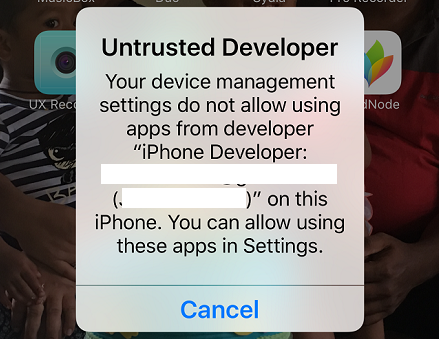
Step 8: Once you see the “Complete” message on it, wake up your iPhone and go to “Settings > General > Device Management”.


Step 9: Open the just installed profile, and trust the developer.


Then your installed app will be verified.


That’s all. Now you can launch the side-loaded application from the iPhone’s home screen.

Don't forget to SHARE , LIKE OUR FACEBOOK PAGE and SUBSCRIBE .

Thursday, 18 May 2017

iOS 10.3.1/10.3 Jailbreak ( iOS Assistance )

iOS 10.3.1/10.3 Jailbreak.

zJailbreak is the only Jailbreak solution for iOS 10.3 and 10.3.1.
You can install application using zJailbreak to your device.
It allows you to install Jailbreak apps to the iOS 10.3/10.3.1 iPhones, iPads, and iPods.

How to install zJailbreak
zJailbreak is a non-rooted app which can install great Jailbreak apps for iOS 10.3.1/10.3 version. We can assume that zJailbreak app will be the next generation of the Jailbreaking method. More info about the zJailbreak.
Currently, zJailbreak is the only hacking method for iOS 10.3.1/10.3. You can install a Cydia lite version (Not the full functional Cydia) with zJailbreak.

STEP 1 :   Visit this page from your iOS 10.3.1/10.3 iPhone, iPod touch or iPad

STEP 2 : Tap the Install zJailbreak button

STEP 3 : Tap the next, You must enter your device passcode. 


zJailbreak compatible devices :
Phone 5s /iPhone 6 / iPhone 6 Plus / iPhone

6s Plus / iPhone 6s / iPhone SE

iPod Touch 6G

iPad Mini 2 / iPad Mini 3

iPad Air /iPad Air 2 /iPad Pro /


Jailbreak app installation guide for iOS 10.3.1 / 10.3 
Anzhuang is not a iOS jailbreak tool, and you can use it for install jailbreak apps as an online. Please follow below Anzhuang step guide to install most popular jailbreak apps.
  • Open zJailbreak app manager Install zJailbreak now if you have not installed it  
  • Find Anzhuang app and install it 

  •  Now select iOS 10.3.2 jailbreak application and click the generate code and copy the code

  • Now open Anzhuang and paste the code
  • Now tap the install button


Please SHARE , LIKE and feel free to contact AUTHOR for assistance

Tuesday, 16 May 2017

iOS 10.3.2 Jailbreak ( iOS Assistance )

Apple has now released iOS 10.3.2 download, a small release that fixes bugs that showed up in iOS 10.3.1 and helps to improve performance. It also contains a number of security fixes that have got the jailbreak community concerned that there won’t be an iOS 10.3.2 jailbreak for iPhone. The good news is, there is one and it is available for download now. With iOS 11 the next big thing, it is likely that Apple will slow down on iOS 10 releases now and concentrate on just maintaining it. Here’s how to jailbreak iOS 10.3.2.

How to Jailbreak iOS 10.3.2 : Safari Browser

Don’t worry about any other browser because Safari is the only one that will work :
Open Safari browser and go to downloadpangu.org


 2. Our mobile web page will load so tap on the UP arrow , top or bottom of the page.
3, When the new options load on the screen, select and tap on Add to Home Screen 

4. You are now going to be asked to give the app icon a name so type Pangu into the box . Tap the Add button and close Safari


5. Look on your Home screen and you will see the Pangu icon

iOS 10.3.2, Updates Now Available: Here's What's New ( iOS Assistance )

iOS 10.3.2 update

The iOS 10.3.2 update primarily focuses on bug fixes and security patches, and the release notes vaguely says, "includes bug fixes and improves the security of your iPhone or iPad." The security update page says that bugs in Safari, notifications, CoreAudio , AVEVideoEncoder, iBooks, WebKit-related fixes, and more have been tackled with in this update. If security is your priority, we recommend you to download the update as soon as possible.
This update will be available for iPhone 5 and later devices, iPad fourth generation and later devices, and iPod touch 6th generation and later devices. Head over to Settings > General > Software Update to download and install the new update. Alternatively, you can even update via iTunes. First install iTunes, and then connect your iOS device to your PC or Mac. In iTunes select your device's icon on the top bar, click the Summary tab and then click Check for update. Now, click Download and update. At this point, you should follow the simple on-screen instructions to install iOS 10.3.2. Ensure that you have at least 50 percent battery backup, and a strong Wi-Fi connection when attempting to update. Don't forget to backup your iOS device before you download and install the update.

This update:
  • Fixes an issue where audio may stutter when played through USB headphones
  • Enhances compatibility of the App Store with future software updates
  • Adds support for media-free installation of Windows 10 Creator Update using Boot Camp


As a reminder, iOS 11 is just around the corner, ready for an announcement at Apple's WWDC conference which starts June 5. Some rumors of little credibility but big hope suggest iCloud integration and more contextual learning capabilities for Siri, as well as group FaceTime calls and design tweaks as possible new additions. Apple doesn't seem to be running out of ideas anytime soon!

Things to Know About the iOS 10.3 Update ( iOS Assistance )

Things to Know About the iOS 10.3 Update.

Apple recently released its iOS 10.3 update and today we want to take a close look at everything we know, right now, about the the iOS 10.3 update and its release for iPhone, iPad and iPod touch.
 Today we want to take an updated look at the most important things to know about the iOS 10.3 update and its release.
 
We’ve downloaded the iOS 10.3 update on the iPhone 7, iPhone 6s, iPhone 6, and iPhone 5.
The iOS 10.3 update is massive, over 600MB for the iPhone 7, and the installation process took a lot longer than usual due in part to Apple’s new APFS file system.


 Battery life is currently holding up on all four phones. We haven’t experienced any weird drain when in use or standby. Wi-Fi, Bluetooth and cellular data are also stable.
We’ve noticed some improvements to the iPhone 5’s boot speed and its UI. The user interface feels faster and more fluid than the previous versions of iOS 10.
As of right now, iOS 10.3 is treating these three devices well and it’s recommended if you’re interested in iOS 10.3’s features, protecting your device from potential harm, or if you’re suffering from an unfixable iOS issue.


iOS 10.3 Problems

iOS 10.3 users are complaining about a wide range of issues including weird battery drain, issues with Bluetooth and Wi-Fi, lag, random reboots, and issues with third-party apps.
As of right now, these issues are isolated. They’re also extremely common after a major iOS update release.
Most of these iOS 10.3 problems can be solved from the comfort of a computer chair at work or your home.
If you’re seeing an issue after downloading iOS 10.3,take a look at the step below .


Downgrade & iOS 10.3.1

If you decide to download the iOS 10.3 update know that there is no longer a way to drop down to another official version of iOS 10.
If iOS 10.3 is causing problems for you you’re stuck until Apple rolls out a new version of iOS 10.
Apple’s no longer signing off on iOS 10.2.1 which means you can’t drop down to it if you’re unhappy with the iOS 10.3 update’s performance on your iPhone or iPad. Unfortunately, you can’t drop down to anything older than iOS 10.2.1 either.
 follow these steps here to modify / change your iOS 
Or click here : ipsw.me
Also note that you can now “upgrade” to iOS 10.3.1.


Tuesday, 2 May 2017

How to install iPhone paid apps for free ( iOS Assistance )

There are several ways of getting this done i.e using iFunbox , AppCake e.t.c
In this post i'll be assisting you with the most reliable for already jailbroken devices which is the AppCake.

Appcake is an application that allows users with jailbroken iOS devices to download paid apps free of charge so they can try them before buying them. iOS users who used Cydia to jailbreak their devices can install Appcake directly from the Cydia application.

1.  Launch the Cydia app from the Home screen of your iOS device.  The application may take up to several minutes to load if there are new updates available.  


2.  Tap on “Sources" at the bottom of the Cydia home screen 
 

3. Add the sources   Go to Sources tab in Cydia, tap Edit and then Add.

 A dialogue box will display on-screen.


4.  Always use Official Repo. Put the repo in the box: “cydia.iphonecake.com” into the dialogue box and tap on “Add Source.”


5.  Confirm to Add. Tap on the "Add Anyway", to ignore the warning about piracy Your iOS device will take a few moments to download the resources needed to run Appcake.


6.  Finish Adding. You should see a new source added, called: AppCake.


 7.  Find AppCake  Go into the source, then tap All Packages, you should see AppCake . Tap on “AppCake".(If your device is iOS7)

  • If your device is iOS4, tap "AppCake(for iOS4.2&lower).
  • If your device is iOS6, tap "AppCake for iOS6".


8.  Install AppCake. Choose the right AppCake for you, then tap 'Install',then on “Confirm” located at the top right corner of your session. Appcake will begin the installation process.

  • If you are using iOS 7, you will also be required to install a patch called “AppSync Patch iOS 7.x” in order for Appcake to run efficiently on your device. This patch can be installed directly from the Sources screen.


9.  Tap on “Restart Springboard” when the command displays on-screen to successfully complete the installation process for Appcake

  • When installing Appcake, some users may see an application called “AppSync” being downloaded at the same time. This app is required for use with Appcake on iOS devices that had never used Installous prior to downloading Appcake.
 

10.  Appcake will now display on your Home screen and be ready for use.


Saturday, 11 March 2017

How to jailbreak an iPhone or iPad running iOS 10.2 ( iOS Assistance )

How to jailbreak an iPhone or iPad running iOS 10.2

How to jailbreak an iOS 7 iPhone
So, if you want to jailbreak your iPhone or iPad running iOS 10.2, you’ll have to use the recently released Yalu jailbreak, however it’s not all smooth sailing. Unlike with other jailbreaks, the developer has flagged the Yalu jailbreak as being an alpha build, meaning there might be issues on your device. Proceed if you desire, or you can hold off for now and wait for a more stable build to be released in the coming weeks.
Also, the jailbreak only supports certain devices at the time of writing:
  • iPhone 6s
  • iPhone 6s Plus
  • iPad Pro
  • iPhone SE
Unfortunately, those with an iPhone 7 or 7 Plus are out of luck for now, although support should come in the following days or weeks, so we’d avoid updating to iOS 10.2.1 if you’re planning to jailbreak. For those with an iPhone 6s, 6s Plus, iPad Pro or iPhone SE, follow these instructions to jailbreak your iOS device running iOS 10.2.
1) The first step is to download the tools required – you can download the Yalu Jailbreak IPA for iOS 10.2 from here (named yalu102_alpha.ipa at the time of writing), and you can grab the appropriate version of Cydia Impactor (Mac, Windows, Linux) from here.
2) Unzip the Cydia Impactor file you downloaded above, and run it.
3) Once Cydia Impactor is running, connect the iOS device you want to jailbreak to your Mac/PC using the supplied Lightning cable. It should be automatically recognised by the app.
4) Once your iOS device is connected, drag yalu102_alpha.ipa (the Yalu jailbreak IPA) into the Cydia Impactor app, click the ‘Start’ button and click ‘OK’ when an Apple Developer Warning appears.
5) The next step is to ‘sign’ the app using an Apple ID – the developers assure users that the information is used only for signing the app and nothing more, but those who want to be more secure can opt for a secondary Apple ID. Anyway, input your Apple ID email address, click ‘OK’, then input your Apple ID password and click ‘OK’.
6) Cydia Impactor should then automatically prepare everything based on your input, and sign the IPA file. If all goes well, the Yalu app should then be installed on your iOS device.
7) On your iOS device, open the Settings menu and head to General > Profiles & Device Management. Tap the profile named as the Apple ID you signed in using the Cydia Impactor app and make sure you establish it as a trusted developer by tapping Trust.
8) Open the newly installed Yalu app (labelled yalu102) on your iOS device and press the Go button to initiate the jailbreak.
9) Wait while the jailbreak payload is injected into the device – this may take some time, and it’s important that you don’t touch your iOS device during this process. The screen will go white, then will reboot once the jailbreak has been completed.
10) Once the device has restarted, you should see Cydia appear on your Home screen – open the app and begin installing your favourite jailbreak apps and tweaks.
As the jailbreak is only semi-tethered at the time of writing, you’ll have to re-run the Yalu app every time you restart your device to re-jailbreak it. If a fully untethered jailbreak is released in future, we’ll update this section so make sure you keep checking back soon.
Read on to find out how to jailbreak an iOS device running iOS 9.

Wednesday, 1 March 2017

How to unlock a disabled Apple ID ( iOS Assistance )

How to unlock a disabled Apple ID: Restore your account when your Apple ID is locked 'for security reasons'

How to unlock a disabled Apple ID that's locked for security reasons

Apple takes security very seriously, and if it suspects your account has been hacked it will suspend it. You'll get a message that your account is "locked for security reasons". Here's what to do.

by


How to reset your Apple ID when it has been blocked for security reasons

My Apple ID has been locked "for security reasons". How do I unlock my Apple ID?
Your Apple ID and password are used throughout Apple's network of services. Which makes it particularly inconvenient when Apple locks your Apple account and sends you a message that it's locked for "security reasons".
This is supremely annoying, especially if you're trying to read your mail or get the latest app from the App Store. But it's all for the best, because often this warning means that somebody has been trying to get into your Apple account, and Apple has thwarted them. Your Apple ID is locked typically when somebody enters your password incorrectly too many times.
Here's how to unlocked a disabled Apple ID and account that's been locked for security reasons.

How to unlock a disabled Apple ID: How do I know if my Apple ID is locked for security reasons?

If you suspect your Apple ID has been locked you will see one of these alerts:
  • This Apple ID has been disabled for security reasons.
  • You can't sign in because your account was disabled for security reasons.
  • This Apple ID has been locked for security reasons.

How to unlock a disabled Apple ID: What to do if your account is locked for security reasons

Apple ID locked for security reasons
Follow these steps if your Apple ID has been locked:
  1. Open Safari on a Mac.
  2. Visit Apple's iForgot site.
  3. Enter the First Name, Last Name and Current Email Address fields.
  4. Click Next.
  5. If you have two-step verification enabled you'll need to enter the Recovery Key. If you don't have two-step enabled skip to the next step. You should have the recovery key printed out and stored safely somewhere. Enter the number and click Next. Select the phone number used for two-step verification and click Continue. Enter the Verification Code and press Continue.
  6. Enter the New Password and Confirm Password fields.
  7. Click Reset Password.
You will now have reset the password for your Apple ID. This also unlocks the account and enables you to start using it again. You will need to use the new password with all your accounts on your iPhone and Mac.
Reset your password

How to unlock a disabled Apple ID: Update your password on an iPhone, iPad, or iPod touch

Follow these steps to update your password on an iOS device:

Ads by Revcontent
  1. Tap Settings > iCloud.
  2. Tap Edit, if asked.
  3. Enter your new password and tap Done.

How to unlock a disabled Apple ID: Update your Password in macOS Sierra

Here's how to update your password in macOS Sierra
  1. Open System Preferences (Apple menu > System Preferences).
  2. Click iCloud.
  3. Click Sign Out.
  4. Enter your new password and click Sign In.
You may also need to enter the new password as required in Mail, FaceTime, iTunes and other services. These will request your password as needed and then remember the new password for later.

Wednesday, 1 February 2017

iOS 10.2 JAILBREAK + video ( iOS Assistance )

For every new update Apple puts out, there’s a small and intrepid team of hackers out on the internet trying to break Apple’s security. Running a jailbroken version of iOS lets you take full control of the software, and consequently install every UI tweak and additional feature you can think of.
Jailbreaking used to be more popular, back in the day before you could delete the Stocks app, and pre-copy-and-paste. These days, it’s a more niche activity.
Video source from CrackUriDevice
But that hasn’t stopped hacker Luca Todesco from releasing a semi-stable iOS 10 jaibreak that works up to iOS 10.2, on most devices. So far, it works on the iPhone 6S or 6S Plus, iPhone SE and iPad Pro. There’s an iPhone 6 version in the works, according to the Reddit Jailbreak sub, but the iPhone 7 is going to be much harder to crack.
A complete video guide to the procedure is embedded above, which only requires a little bit of technical proficiency. It’s not as involved as you might think, but it does require messing around with developer tools so you should at least know which end of the Lightning cable is which.
In short, you need to download some files onto your computer (which you can find here), connect your device, use iTunes to install, then run the corresponding Yalu app on your phone to complete the jailbreak. Although this release is “semi-stable,” all jailbreaks do tend to be buggy, and there is always a danger with this that you might brick your device. Have fun — just make sure your data is safely backed up first.